
This page documents the revisions made to the GBR2MIC program. Please consult it to determine if you are running the current version and to see what fixes/enhancements have been made to the program.
This version fixes a problem with the Gerber importer. It also includes the latest boolean engine.
This version fixes a problem where non-printing characters inside a LAYER NAME directive (%LN) caused Gbr2Mic to drop data.
The new version of gbr2mic quitely removes from the input stream all characters (except CR and NL) that are not between SPACE and ~.
This version fixes a problem that resulted in the crash of the Gerber preprocessor
split274x. The crash was not associated with a single or any particular
polygon in customer Gerber file, rather so many warnings were generated
during preprocessing it overflowed a static buffer that was not large
enough to accommodate the string length of the report. The offending
code was changed to protect against this condition and in addition, the
buffer in question is now dynamically allocated.
Some problems in error/warning reporting were discovered while investigating this issue
and these have been corrected; previously not all warning and errors detected by the boolean library were reported.
This version fixes all the issues that were attempted to be corrected in v2.69. There appeared one remaining issue in v2.69b where a 10 nm wide polygon created as part of conditioning (-qualify which is now by default passed to the split274x Gerber preprocessor) was dropped by a downstream module just before the formatter. This module was changed to address this issue.
The previous release v2.69 addressed an issue where degenerate polygons fooled the LA formatter with respect to polygon orientation. Some of the polygons were interpretted as scratch data or some constituent "loops" that made up these polygons were interpreted as scratch data. This was fixed by qualifying all polygons at the Gerber level, i.e. in the split274x Gerber preprocessor. Customer complained that some polygon data that were repaired by v2.69 were truncated with features on the other of 40 nm. v2.69b retains the spikes that were truncated.
Updated the revision number in the GUI.
By default this version turns on a new option (-qualify) in the Gerber preprocessor where G37/G36 fills are passed to the boolean engine for validation. The Gerber preprocessor does this making use of multi-threading as much as possible, i.e. it buffers polygon data and will process these polygons en-masse when triggered by a layer polarity change.
Because this process is multi-threaded, this new functionality should not significantly impact throughput.
The new command line option "-qualify" can be turned off with "--qualify" by adding it to the SplitArgs resource field in the .artwork/gbr2mic.Xdefaults file:
gbr2mic.SplitArgs: --qualifyIt can also be done in the GBR2MIC user interface by going to the File > Preferences > Options... dialog.
64 and 32 bit versions of micvu are now included in the gbr2mic package.
Support for Ubuntu 20.04.4 LTSThe gbr2mic package now runs seamlessly on Ubuntu 20.04.4 LTS. As this platform does not support a 32 bit subsystem, micvu was not available on previous releases of gbr2mic; the 64 bit version of micvu remedies that. Some minor changes were made to address some Ubuntu idiosyncrasies. At installation time, micvu is soft-linked to micvu64.
This version includes the latest Gerber modules and boolean engine.
This version is the same as 2.68a with the exception of 3 files - gbr2gdxm, split274x64, and version.txt
This version fixes the long time preprocessing issue reported by Mycronic for g508598-2.gbx. The issue had nothing to do with file size limitations - The real problem was a "hang" (a multi-threading deadlock) in the preprocessor as the result of unique construction of this file.
Fixed an overflow issue when the input file has a very large extent.
Fixed the issue where clear/scratch data is missing from the output.
Added a check for span output tolerance when precision may be lost from a non standard Gerber input file. When this issue is caught, the
user has an option to specify a larger span tolerance (for example: -sr_span_tol:0.2um) or to specify a format with more precision using the "-fmt:NM" optional argument (for example -fmt:26).
The user should be careful in using such large precision especially if the extent of the input file is large.
This version fixed a bug in the formatter where it outputs a polygon with a zero radius arc in the wrong polarity. This manifests itself as a malformed pattern. LA files do not support arcs with widths so we convert these arcs into polygons. In one of those polygons, a vanishing arc is created. In the previous release, the formatter reverses the polarity of these polygons. In this release, the formatter outputs the polygon correctly by ignoring the zero radius arc and treating it as a line segment.
In previous releases, xgbrvu was using an old version of Flexlm and its node lock licensing didn't work in Ubuntu 16. In this release, we updated the viewer with a newer version of Flex and added a 64bit version of the viewer.
This version fixes a crash when trying to set the Working Directory.
Removed the AptGen option (old aperture generator).
Version 2.64 includes a new Synthesize Flash Option which can be turned ON in gbr2mic's Setting Dialog.
Some Gerber files make extensive use of the G36/G37 command to draw geometries such as rectangles and circles. This These poorly optimized files take a long time to convert to MIC and produces a larger MIC output than necessary.
The Synthesize Flash Option can detect such drawn shapes and output them as flashes to a new smaller Gerber file.
Rectangles: non-rotated rectangles are converted directly to a simple rectangular flash.
Rotated Rectangles: are converted to macros.
Circles - whether they are drawn with two arcs or with many small segments are converted into round flashes.
The user can also set a maximum dimension for this synthesis - any G36/G37 shapes that exceed that dimension will not be converted to flashes.
When synthesizing rectangular flashes from polygons, the software uses one tenth of the macro tolerance. The default value used for rectangular polygon synthesis is 0.1um or 100nm.
Macro tolerance is used in the Gerber pre-processor module for instances when the input Gerber file has multiple macro definitions that are "essentially" the same within the given tolerance. This reduces the number of macros defined in the file. The default macro tolerance is 1um.
As a result, synthesizing rectangular flashes can differ from the original data by up to 0.1um.
If the user wants a more precise synthesized macro, he/she can specify a smaller tolerance in the Preprocessor Optional Arguments located in the gbr2mic Options menu.
For example: -macro_tol:0.00001. (The value on the command line is in the units of the Gerber input file, MM or INCH).
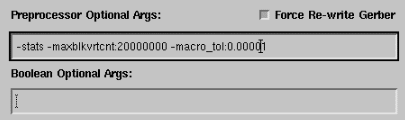
This new draw-to-flash function improves the conversion speed on some Gerber files. For files that make extensive use of G36/G37 to draw rectangular and circular shapes we saw up to 10x speed improvement in conversion time.
This new release fixes a program crash when translating a 54GB Gerber file.
This new release fixes a problem where a Gerber file had SR command with more than 43000 along one of the axes. The limit now is 64000.
This new release fixes a problem where gbr2mic dropped data with no errors when using chord error of 0.01 micron.
This new release checks if libstdc++ is incompatible and chooses an older vintage of the library during installation. This was needed to support older versions of Ubuntu such as 9.10.
Added an option to end conversion when error occurs.
Added an option to keep zero width flashes - some of gbr2mic data may include zero width. This data will not show in the final output but it can affect the extent of the output if it happens to be on the outer edges.
This version fixes the big arc issue by automatically passing the ArcSag value (set in the Configuration dialog) to the pre-processor.
In a normal run when "Arc Segmentation" is not checked then the only circular data in the flow path from Gerber to LA file that gets preserved are round flashes and donuts and the end caps of round path draws.
However, if during preprocessing of the Gerber file some circular data is suspected of being problematic, it will be converted to segmented data. The two most common conditions are very short arc segments which are replaced with a single linear draw and "shallow" arcs where the radius is very large.
In this latter case the arc is replaced by segmented data approximating the original curve. If this condition is flagged by the preprocessor, a message to this effect will show up in the log file (Circular data exceeded 31 bit integer range). This message is not an error but only informational.
Other informational messages (none of which necessarily imply a problem) that can appear include:
The following conditions were trapped while processing this file

  An AS Axis Select mass parameter was encountered or set by user
  An MI Mirror Image mass parameter was encountered or set by user
  At least one large vertex count polygon was broken up into smaller pieces
  Data extents exceed 31 bit integer range
  Data extents exceed original Format Statement
  Essentially identical dcodes were removed
  Essentially identical macros were removed
  Exceeded highest alllowed Dcode: 9999
  File rewritten: polarity changed as per user (-ippos:1) or policy
  File rewritten: was %FSLI now %FSLA
  File rewritten: was %FSTA now %FSLA
  Format Statement exceeds eight digits
  Multiply defined decodes were encountered
  Redundant LPD and/or LPCs removed
The default chord error is changed from 1um to 0.1um.
This version includes additional X libraries in the bin/lib folders to support various Linux platforms.
This version (as the previous version v2.59a) will not replace or modify an existing copy of the ~/.artwork/gbr2mic.Xdefaults file during installation.
This version fixes an issue that was manifest when redundant (consecutive) %LPC*% and %LPD*% commands were issued for empty layers. This condition caused the Gerber preprocessor to compute incorrect file offsets to the Gerber file's internal layers which in return resulted in incorrect rendering of the Gerber layout.
Fixed an issue where a single polygon, made up of digitized areas connected by "cutlines", is dropped. The boolean function that processed/repaired holes and cutlines was updated.
Fixed an issue where data are dropped when an input Gerber file with Negative Image Polarity (IPNEG) starts with a Dark Level Polarity (LPD).
Fixed an issue where split274x was not able to handle polygons with large vertex count.
Fixed an issue where a Gerber file with an axis select that assigns output device axis A to data axis Y and axis B to data axis X (ASAYBX) is not rotated properly.
Fixed a bug with multiple aperture substitution.
Fixed a crash when the Working Directory is clicked from the drop-down menu. This was caused by the directory dialog not being created beforehand.
64 Bit - split274X ParserAdded code to check if the machine/OS is 64 bit; if so the 64 bit version of split274x is used to process the incoming Gerber data. This allows larger maximum vertex count polygons that the 32 bit version cannot handle.
This was implemented to address a customer file that had a single polygon made up of more than 600,000 vertices. The 32 bit version of split274x could not handle such a polygon but the 64 bit version was able to break this polygon into multiple smaller polygons (each with < 32K vertices.) To perform this operation the 64 bit version used about 8GB of virtual memory (something a 32 bit implementation could not address.)
Modified gbr2mic to pop-up an "Error" instead of a "Success" message box on failure. In previous versions, an error was saved in the log file but wasn't reported in the GUI.
This release takes care of three issues reported by clients.
Enhanced multi-aperture support to include optimizations to remove redundant/equivalent DCODE and MACRO definitions. The following reductions were observed in real customer data with files that included over 50000 macro definitions.
Fixes an issue related to a problem that was the result of an extremely huge (> 4M vertices) vertex count in a single polygon. ADressing the problem required some optimizations and resulted in a reduction of conversion time from 8 hours to 10 minutes.
Vertex Count LimitationsThere is no limit on number of vertices with polygons that do not contain circular data.
However, polygons, i.e. G36/G37 codes, with even a single circular command are still limited to 500K vertices after segmentation.
This version fixes an error when an arc had an extremely large radius. The large radius causes an internal integer overflow.
The problem is now avoided by segmenting the data on the fly.
This is the first release with 64 bit modules to support output files over 4GB.
One of the internal modules, gdxmiclf, (the LA/MIC file formatter) comes in two variants: 32 and 64 bit. The 32 bit module is first launched to preserve backward compatibility and if the program determines that it will not be able to create a proper output, it will spawn its 64 bit sibling (gdxmiclf64) to complete the same task that was demanded of it and then kill itself when gdx2miclf64 completes.
The extent problem was related to using the largest dimension of a rectangular flash to compute extents. Now height and width are used.
Folded polygons in Gerber fileA user supplied file included many folded polygons, 7 of them were not converted properly.This version fixes the issue.
This version has a new formatter gdxmiclf which fixes the extent issue with a customer file. The problem was related to extent calculation of one dimensional AREF data. These are directly related to SR constructs in the GERBER input files.
New gbr2mic front endThe version has a new front end shell gbr2mic which manifests the correct version number and a new Configuration dialog which now exhibits much improved behavior when the display server is Xming running on a PC. Previously the widgets attached to the Compaction group were displayed poorly.
Updated xgbrvu viewerAn updated version of xgbrvu is also included. The previous version of xgbrvu erased the macro file generated by the gbr2mic shell. This would generate a crash during subsequent translations under certain conditions. This problem has been fixed.
GBR2MIC failed to convert Gerber file which contained "bad" G36/G37 polygon containing circular data. This has been fixed.
In the offending polygon the end point coincides with the arc center. We now connect the start point to the end point with a linear draw. Another CAM tool has a different policy, it simply drops this arc data altogether.
GBR2MIC failed to convert Gerber file with internal layer that is positioned after the 2GB mark. This has been fixed.
GBR2MIC failed to convert Gerber file due to very small Arc Resolution.
In this new version, if the chord error is set then it will determine smoothness,
otherwise smoothness is determined by the arc resolution. This is a new policy and we hope it will make it easier to use the Chord Error parameter.
If a user depends on Arc Resolution for smoothness it will result in larger LA files and longer processing times.
GBR2MIC now supports files over 2GB in size. Customer problem file was 4.5GB Gerber file.
Our GBR2MIC front end had trouble with a draw that collapses to a flash and no X or Y coordinate value appeared explicitly with the D01.
A typical problematic Gerber fragment looks like the following:
X0013215250Y0030720381D03*
G54D201*
X0012217030D02*
D01*                      <----- this Draw-To should become a flash
X0012799642D02*
The number of allowed vertices in GBR2MIC has been raised to 512K (previously 256K).
The decomposition of large vertex polygons has been improved in two ways:
The orientation of a circular boundary was handled incorrectly causing a scratch image instead of filled.
This has been fixed.
Composite curve
A Gerber polygon with more than 32000 vertices wasn't handled correctly by the translator.
The problem occured in the module that is responsible for chaining data together in an internal
construct called "composite curve". Instead of properly being chained together, overlaps were being created.
The simple piece of bad code was corrected. The problem introduced with this bad piece of code was normally
repaired by the software later on in the data flow.
That is why it was never seen before. This particular case was seen because the repair failed.
Data was dropped during the conversion when an array has negative IJ values. This has been fixed.
The orientation of a circular draw with non-zero width was
incorrect when segmentation was turned off. This resulted in "scratch"
data in the ST file when in fact the data should have been "paint". When
the arc was broken up into segments the output was correct.
Fix: The broken code has been in place for over 10 years. Amazingly this
coding error (a typo probably resulting from a copy and paste from a
similar piece of code - the arc has two ends and the indices for an
array of directional information used the data from the wrong end) has
not surfaced before because there was some backup code which was able to
take "corrective" action in case a consistency check failed. In the case
of this particular circular draw the corrective action failed which
resulted in the wrong orientation in the LA file. Only 8 characters in
the code for the LA formatting module was changed. There were no
algorithmic changes made and the v217a version passed the regression
test without any exceptions.
First Linux release of GBR2MIC. This new version supports Flexlm floating with LM_LICENSE_FILE or ARTWORK_LICENSE_FILE environment variable to point to port@machine_name.
The problem with this issue is related to the fact that Fill-On-Fly (POEX and G36/G37) data is treated as a "composite curve", i.e. a closed region whose boundary is composed from a sequence of a entities such as arcs (Gerber circular data G02/G03 data) and zero width draws (G01 data). There is no restriction regarding the length (i.e. vertex count) of the zero width draws; However, internally to the flow at one point these are chopped into pieces with maximum vertex count equal to 4000. The problem was due to the fact that the pieces which should be organized "tail" to "head" were not. A vertex between the "tails" and "head" was dropped which resulted in a "composite curve" with a gap.
The issue had to do with a Gerber file that was the concatenation of multiples 274x files. Even though it is supported, the filter that provides support for this capability incorrectly converted circular data to G01 linear data. This was a special case of G02/G03 data used to draw a circular fill area. The original code anticipated that G02/G03 codes used in G36/G37 blocks be part of something larger than a single coordinate, i.e. a circular fill.
Illegal polygon in Gerber fileBecause the Micronic software is sensitive to illegal polygons, data is qualified and checked before conversion to LA format in both the GBR2MIC and DXF2MIC. The dropped vertex was the result of incorrectly repairing a polygon that was detected as having a small notch (< 0.010 um). The repair for the particular condition that was detected has been fixed.
GBR2MIC reported extents of LA file that were off by 1 micron when Gerber data was reversed. This issue was fixed.
MICVU WindowsMICVU for Windows major release. This version supports the latest Flexlm licensing and includes all the features available on the Solaris version.
MICVU didn't display correctly paint/scratch data of LA files created directly by Micronic's Job Planner. This issue was fixed.
MICVU WindowsMICVU for Windows major release. This version supports the latest Flexlm licensing and includes all the features available on the Solaris version.
GBR2MIC would output an LA file with extents larger than they should. This was due to a very shallow arc. This issue was fixed.
Warning during scanning phaseA very large Gerber macro caused a warning at the scanning phase. This issue was fixed.
GBR2MIC would output a polygon with reversed orientation, resulting in a scratch rather than the desired paint). The problem as usual is the result poor quality customer data (that seems to be the nature of GERBER). This is issue has been fixed by adding the same polygon checking/repair code that was recently added to DXF2MIC.
GBR2MIC would crash when the number of paint/scratch layers exceeded 512. This had been fixed and the limit now is 1024 paint/scratch layers.
GBR2MIC would crash when the path length was more than 1000 characters.
The limit is 10000 now.
Another problem due to the path was incorrect layer table in LA file.
Extent reported in LA file was sometimes much larger than needed. This was fixed. This problem was the most severe in the context of GERBER files with large offsets, i.e. not centered about 0,0 and contained SR or LP blocks with extents were on the order of the GERBER file offset from the origin.
The speed of the GBRUnion module was improved by a factor of 2-4 in Compaction mode on the test files from LMTEC.
The GBRUnion module has been integrated into GBR2MIC. This module can unionize the input data prior to conversion and produces a MIC file that rasterizes much faster. It is primarily intended for very large Gerber files that can take hours to rasterize.
The GBRUnion module requires a separate license feature and when turned on it may require a longer conversion time. However the total processing time (conversion time + MIC raster time) is greatly reduced for very large files.
There are five modes of operation now.
This version runs on Solaris 8 and 10.
MICVU fixMicvu now supports 32 bit (true color) enabled displays. Bug reported by Frederic.
274X updateThis version incorporates our latest Gerber RS274X reader.
Support for complex boundariesThis version supports complex boundaries with up to 500,000 verices in one polygon. Bug reported by Advanced Reproduction.
SR SupportThis version has better support for the SR command. A bug was fixed when the SR values were negative.
GBR2MIC failed to convert a very large Gerber file. The upper size limit has been greatly increased. [submitted by:Phoenix Precision Technology in Taiwan]
GBR2MIC had a problem with a multi-aperture (same aperture defined twice with different values) as well as a flat footprint of over 2GB. Both issues were corrected. [submitted by: Lasertech]
GBR2MIC failed to convert Gerber files that more than 7 digits of accuracy. This is now supported.
Upgraded the Gerber 274X reader to the latest code. That includes several enhancements we made in our other Gerber products. This version also includes the latest Gerber viewer with better support for 274X files in both viewing and plotting.
Log File
The program will not show warnings for mass gerber commands. Requested by IBM Japan.
274X files with drawn macro
274X files that contain MACROs that are used for drawing are not
supported. The scanner detects this and issues a message to this
effect. The offending dcodes are reported in the log window.
Log File
Added information to the log window indicating whether or not
ARCS have been segmented. This appears together with the "Arc
Resolution" and "Arc Sag" parameters in the BENCHMARK section of
the log window as shown here. It is my sense that you should make
use of the Arc Sag parameter TOGETHER with Arc Resolution. This
will make for the smallest files while not losing any precision.
Small Arcs
Arcs with width that have a radius that is less than the width were
not handled correctly. This is now fixed.
Large radius arcs
Large radius arcs are now supported, i.e. GERBER circular commands
where the radius exceeds 2^32 nanometers. This problem was reported by
Advance.
Problem with boundaries with more than 4096 vertices
A bug was introduced with large vertex count in v1.71. This
problem manifested itself in boundaries with vertex counts
greater than 4096 vertices.
Non supported 274x commands reported in log file
Nonsupported 274X mass parameters are reported in v1.82. When
274X data is imported, a file called "unsupport.lst" is created
in the working listing the nonsupported items. The gbr2mic
shell addes this info to the log file along with hints as to what
these mass parameters might be.
Fix Composite Polygon Direction Bug
The computation of direction (CCW, CW) for composite polygons - an internal polygon database type composed of lines and arcs - was buggy leading to
the wrong polarity on the photomask. This has been corrected.
Very Long Translation Time
certain Gerber files required an extraordinary long amount of time
to convert. This was corrected
Custom Aperture for RS274D Gerber Input
Users can specify custom apertures for RS274D Gerber input. All
definitions of custom apertures are provided in a text file by the user.
The syntax of the text file should follow that of RS274X macro
definition.
The file is provided and specified as the Custom Aperture file in the Configuration dialog box. GBR2MIC will treat this in the same way as a RS274X custom aperture definition.
Maximum Number of Vertices for Boundaries
The upper limit has been increased from 4096 to 250K. (This has been accomplished
by adding a new routine to the processor that breaks complex polygons into smaller
ones who do not exceed the 4096 limit)
Micronic Aperture File to Artwork Format
Xaptgen has been updated to read the Micronic aperture format file and convert
it to Artwork's apt file format.
POEX/POIN emulation for RS274D files
Ver 1.60 supports POEX/POIN paint/scratch definitions for RS274D apertures. Please
note that the polygon rules that apply to the FIRE 9000 also apply here:
Cleaner MIC Output
The MIC output has been improved to eliminate redundant LAYER and CELL
calls. The output formatter now runs about 10% faster.
Negative Image Border
Added this control to File/Preferences/Options.
RS274D Aperture File
Older versions would remove the aperture file even if the input Gerber
are RS274D format. The aperture file will not be removed if input are
RS274D.
Removing Rs274mac File and GDX File
This version only removes the rs274mac.x file for the specific translation.
It does not do a remove rs274mac.* under batch mode.
This version also removes the GDX file right after it is used by Gdsx2mic,
instead of waiting til the end of the translation.
This version also has the fix to keep the GDX file when both "Keep GDX
temporary file" and "Remove various temporary files" are turned on.
Added Support for RS274X command IPNEG
The polarity reversal command, IPNEG, is supported by creating a user defined frame
as the first dark layer and reversing polarity of all subsequent layers. User can
define the margin between extents of his data and the frame.
Updated 274X Import Routine
Incorporated all updates made recently in the RS274X import and scanning routine.
Improved MICVU
improved the new MICVU adding with layer and composite viewing support
Fixed Problems with MIC 1.5 Formatter
All formatter (LA) issues have been resolved for MIC 1.5. There are no more
errors reported from mictest syntax checker. There were issues in regard to MIC BLOCK
LAYERS, MIC CELL INFO, and MIC ARC DATA. These have been fixed.
RS274D Gerber File
Older versions might generate an error message "xxx.vu: No such file
or directory" in the log file occasionally and would not generate
an Micronic output. This has been fixed.
Also added helpful hints to tell users that 1 and only 1 merge output is needed to translate RS274D gerber file. Older versions would not generate any output or warning/error message is a merge output is not specified.
Multiple Processors
This version has the feature of using multiple processors for translation.
Access the feature through File | Preferences |Memory...
MDA Input Gerber Files
When activated by product number 1351, Gbr2mic will take MDA input gerber
files. It is recommended to run MDA translation using the GUI. Auto
batch mode does not support MDA format. MDA is not officially supported
by GBR2MIC as it does not support all MDA commands.
Error Report for Gbr2mic.bat
This version preserves the .erv file for viewing potential errors when
translation is done using gbr2mic.bat batch run.
Auto Run Translation
When specifying input gerber file in RS274X format, -auto will generate
a batch file and launch the translation automatically. Without -auto,
only the batch file will be created.
These 2 auto batch modes always use the startup directory as the working
directory.
Together with the newly added script gbr2mic.bat, users can use Gbr2mic
to translate a list of RS274X Gerber files automatically.
Batch Translation
Starting this version, all translations are done in a batch file fashion.
A batch file will be created and then the batch will be executed even
in non batch mode. The behavior of batch mode and auto RS274X mode stay the same.
Batch Mode
This version pops up a message box to notify users that a batch file
is generated.
Auto Use Previous Configuration
Added this setting for users to use previous configuration for the last
program run so that they do not need to go through the Configuration
and Aperture steps, they can go directly to Translate after selecting
Gerber files. In this mode, the Configuration and Aperture buttons are
disabled to remind users this mode is set. This mode only applies to RS274X Gerber file.
Access this mode via File | Preferences | Options.
Frame Size
Frame size must be within 500 to 1500.
Temporary Files
Added control to remove .job, .apt, .cfg, .gdx and rs274mac.* files
when exiting and/or selecting another gerber file(s). In batch mode,
this is done in the batch file.
ArcRes
This version saves ArcRes setting to the aperture as ArcRes2. So that Xgbrvu and Gbr2mic have it's own separate ArcRes setting.
Frame Appear Solid Even Where Scratch Data Appears
Scratch data was being dropped which resulted in solid frames. The cookie
cutter routine was not called for all frames in which data to be cookie cut
crossed several frame corners. This was fixed by resetting a flag at
the appropriate place.
Internal Error
Boolean operations appeared to be not working correctly as a re-necklacing
routine created boundaries inconsistent with a vertex count. This was
fixed.
File | Preferences | Memory | Frames | Options.
Batch Mode Now Calculates Total Time
This version reports total translation time also when batch mode is on.
Fixed Licensing Bug in Batch Mode
Version 1.08 would not release the license if Auto Batch Mode and -batch are
used together. This has been fixed.
Automatic Batch Mode
This version allows user to specify RS274X input gerber file from the
command line to run the translation automatically. Syntax is:
$ gbr2mic gerberfile.gbr -out:output.la -274xIf you only want to create the batch file and not actually start the translation process you should use the -batch command.
$ gbr2mic gerberfile.gbr -out:output.la -274x -batchthe gbr2mic -h option now includes this command.
Translation Time Report
Version 1.08 reports translation time including the first stage of
translation. Previous versions would generate a time without the first
stage of translation.
Time is now reported in the following format:
Times: elapsed: 0(min.) 1(sec.) total: 0(min.) 7(sec.) Wed Dec 2 19:23:19 1998This is reported for each stage of the translation. Elapsed time represents time elapsed up to that point. The total time at the end of the log file represents the total time for the whole translation and should be used for benchmarking purposes.
Control Dialog (Button Box)
This version will bring up the Control Dialog to the top if the main
shell Gbr2mic gets the focus again. In earlier versions the control
dialog (button box) might be hidden behind the log window.
Error Report
This version eliminates duplicate errors on the same vertex in the log
file that is read by Micvu.
Working Directory
To set a fixed directory where all output will be generated (temporary
files and/or output files):
1. Set the flag:

                gbr2mic.RememberWorkingDir:      1

in $HOME/gbr2mic.Xdefaults.


2. From within GBR2MIC use the  File|Preferences|Working Directory
   dialog to select the desired directory for output.


To unset this feature, set the flag:

                 gbr2mic.RememberWorkingDir:      0


Note: the space between the the colon (:) and the value 1/0 must be a TAB.
MDA Format Gerber File
This version does not include MDA support but it will be available in
the future as a special option.
Maximum Layers
the maximum number of layers has been increased from 10 to 1024 in order
to attempt to accomodate certain 274X files that use large number of paint
and scratch layers. (Example submitted by Micronics for Unipac).
Reduced Memory Footprint
Some test files were locking up due to insufficient RAM. By changing the relationship
between certain parent and child processes we were able to reduce the amount of RAM
needed.
Fixed Output Error in MIC 1 Format
Corrected an error where some polygons were output with the incorrect rotation
resulting in clear polygons when a dark polygon was expected. (L04.ART test file)
Improved Boolean Routines
This version has a signficantly improved positive boolean (i.e. a routine
that decomposes overlapping positive polygons) over version 1.00. Files
that would previously hang now run to completion. However we still see
some incorrect output in the benchmark files. Most effort is now focussed
on getting the last 5% of the test cases to produce correct output.
Radically Improved 274X Import/Parse Routine
The previous parser/importer for RS274X was written using AWK; on large
Gerber files speed became a very serious problem. A new importer was
written in C with extensive I/O buffering; a 16Mbyte 274X file that required
6 minutes to import into GBR2MIC now imports in 3 seconds. (The same
import C code is now incorporated into XGBRVU also....)
Disable Select Aperture Dialog
If RS274X or MDA file is selected, Select Aperture will be disbled
because no such aperture file need be selected. Previous dialog could have
been confusing to users.
Enable Gerber Viewer Button
If RS274X or MDA type file is selected the Gerber Viewer button is immediately
enabled so the file can be viewed.
Added Remove Overlap Option
Added the option to Remove Overlap. This boolean function removes any overlapping
parts of positive polygons. Such removal is an essential part of paint and scratch -
even on a single layer design overlap removal may be of value to avoid problems
later on if the data is merged with data from other files.
RS274D Merge Control
Added the required dialog/menu so that multiple RS274D files could be merged
either as paint (positive) or scratch (clear) layers. Also controls the output
file name(s).